I don’t know how it is that I have achieved my age (let’s just say “over 60”) without ever traveling to Africa, but I have. A further cause of bewilderment is ignoring the possibility of safari holidays. As a keen photographer, the combination of the light and subjects available in Africa and the thrill of a safari is pretty good, all of which brought me to travel to Zambia in late May to spend four days at Potato Bush Camp on the Lower Zambezi river.
Getting to Potato Bush Camp involves taking a 40-minute bush flight from Lusaka to Jeki airstrip about nine miles from the camp, followed by a car transfer to the river and a boat ride to the camp. For safari newbies, the trip is exciting, especially when you see an elephant washing itself in the Zambezi (Figure 1) or hippos popping their heads up to see what’s going on. Cruising downriver to the camp rates pretty highly as a good way to arrive at a destination.
Figure 1: Elephant in the Zambezi River
Potato Bush Camp (Figure 2) is a small place with a maximum of ten guests at any time in three double-occupancy tents and one large family tent for four people. The structures are tenants in that they have canvas sides and roofs. Inside, they have concrete bases and are furnished to a high standard with a full bathroom, comfortable beds, and plenty of living space. The fact that animals stroll by a vast tent opening is a benefit, even if the calling from hippos on the river made sleeping sometimes a challenge.
Figure 2: Hippos in the Zambezi River close to Potato Bush Camp
The camp center (Figure 3) is where guests come together to eat meals, have drinks, and share stories. The food is good and wholesome and people do not have to worry about getting enough to eat (or not having sufficient drinks available). During our stay, we experienced dinner in the bush and lunch on a sandbar in the Zambezi river. Both surroundings created unique memorable meals.
Figure 3: Camp fire drinks at Potato Bush Camp
Camp Activities
Among the activities arranged by Potato Bush Camp, we did a three-hour canoeing trip down a channel of the Zambezi and spent a morning fishing. The highlight of the canoeing trip was having to leave a place where we had stopped because a bull elephant (Figure 4) appeared who was intent in finding a group of female elephants in the near vicinity. According to our very professional and safety-conscious guides, getting between a bull elephant “in musth” and some females isn’t an intelligent thing to do, so we backed off to the canoes and relaunched onto the water.
Figure 4: A bull elephant approaches at pace
Fishing promises the chance to capture a tiger fish on a catch and release basis. Tiger fish have an impressive set of teeth (they are a relative of the piranha) and fight hard when hooked. Spending a few hours on the river going between different fishing spots is a nice way to spend a morning, especially when wildlife are active on the river banks.
Game Drives
While we saw a wide range of animals and birds during the canoeing trip and when out on the river, game drives are the traditional and best way to get close to animals in their natural habit. We had an excellent guide in James Duncan-Anderson of Wild n’ Beyond Safaris. His knowledge about terrain, animals, bird, and fauna was amazing and his enthusiasm and passion as a guide was marvelous.
James led us out on several game drives using specially-adapted Toyota Landcruisers and one walking tour (complete with an armed game ranger, just in case we got into unanticipated problems with an animal. Fortunately, the skill and care of guides makes it rare for conditions to occur when a ranger needs to use their rifle and we had no problems. During our drives we encountered a small pride of lions (stuffed after a feed on impala), many elephants, hyenas, impala, zebras, waterbuck, bushbuck, warthogs, buffalo, baboons, and one late sighting of a leopard. It would have been nice to see the leopard in daylight, but that will have to wait for another trip. The same is true for hyenas, but we did see lions chasing hyenas in the red light used by guides to highlight animals from game drive vehicles.
Figure 5: Young male lion
Figure 6: Baboon sentry on a termite mound keeps watch for predators
Figure 7: Buffalo – this is quite close enough when you’re on a walking tour
Figure 8: Warthogs
Figure 9: Impalas
Figure 10: Waterbuck
Figure 11: After-dark leopard encounter
Rhinos, giraffes, and cheetahs don’t feature in the Lower Zambezi, so coming back to see them in the wild is a great excuse for a future safari.
Photo Equipment
I brought a Nikon Z9 body and two lenses with me: the 24-200mm Nikkor Z zoom as a “do anything” lens and the 100-400mm Nikkor Z for long-range animal photography. Both lenses worked well and the quality of the images captured by the Z9 is incredible, but I did think that a 600mm or longer lens might be nice from time to time. You can’t have everything, and the 15kg limit imposed for baggage on the bush planes that serve Jeki airstrip mandate against taking lots of equipment.
James Duncan-Anderson told us that safari would either be in your blood and you’ll come back or you’ll stop after one trip. Given that there’s still so many animals and birds to photograph, I think I’ll return to Africa soon. How soon and where remain open questions, but if you’re looking for a good place to start, the Lower Zambezi isn’t a bad choice.
Things have gone pretty well while we’ve had the Audi e-tron in the South of France. It’s an easy car to drive and although few public charging points exist near us, range anxiety was taken care of by the e-tron charger that comes with the car. This connects to a domestic power supply to charge the car, albeit slowly (think over 30 hours to charge from 40% to 100%). In any case, the time needed to charge doesn’t matter all that much because we usually recharge overnight.
Power Surge Causes Problems
And then we had a massive thunderstorm with lightening flashing down near the house. A nearby strike knocked out our Livebox (internet modem and router for the Orange France service), affected the control panel for the gas boiler, and blew the car charger.
When the charger is plugged in, its lights flash as it goes through a self-check phase before it settles down and charges the car. In this instance, the lights stayed red and the reset button didn’t work. In fact, nothing worked and no charge was delivered to the car.
Figure 1: Audi e-tron car charger
The car handbook is written for people who drive e-trons in urban settings when a local Audi dealer is within easy reach. Being told to take the charger to a main dealer isn’t really helpful when you’re deep in rural France. Even if such a dealer was available, there’s no guarantee that they’d be able to help. The charger, as we later discovered, is a EUR 1,000 spare part, so it’s unlikely to figure in the inventory of most dealers. There must be a heap of electronics hidden in the charger to justify such a heavy cost, some of which were probably fried by a power surge caused by the storm.
Problem Solved, But Not a Long-Term Solution
To be fair, Audi has a good spare parts service and can deliver parts across Europe quickly, if the part if available. If all else fails, Audi Assist can recover cars and bring them home. But we needed a replacement for our charger to be able to stay in France for another few weeks.
Fortunately, the good people at Audi South in Dublin (our dealer) turned up trumps and removed a charger from a test car. My son collected the charger and flew with it to Nice and we collected it there (he was coming anyway). We were back in action within four days of the storm.
This is very much a one-off solution to an early adapter problem. Most people who buy e-trons won’t use them to drive across Europe. If they do, they’ll probably recharge using the public high-speed charging points located on autoroutes. But when you go off the beaten track, a 300 km usable range can be used up at an alarming rate, which means that a domestic charge is needed. And few people will realize that the charger provided with the car is a potential single point of failure that could leave them stranded.
I’m sure Audi will learn from our experience. Maybe all Audi main dealers will be asked to stock a replacement car charger, just in case someone needs it. Or perhaps they will bulletproof the charger so that it is less vulnerable to a problem caused by power surges. We’ve learned a lesson too: don’t leave a charger plugged in when storms are in the vicinity. You never know when lightening might cause problems.
On the 156th anniversary of the last day of the Battle of Gettysburg in 1863, it seems appropriate to post notes about a recent visit to the battlefield on June 15-16. Unhappily, I didn’t have as much time as I would have liked, but the time I spent there was interesting.
I like walking battlefields and have done so at places like the Somme, Ypres, and the Normandy D-Day Beaches. You get a certain insight from walking over the ground where armies fought that fills in many of the gaps left by even the best description in a book.
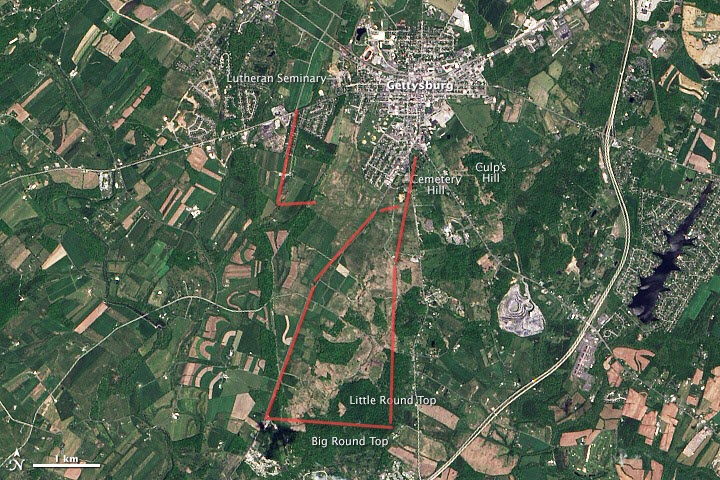
Image of the Gettysburg battleground. The red lines are approximately where I walked (image source: NASA)
Limited Time for a Walk
Because I had limited time, I concentrated on walking the battlefield of July 2 and 3. Compared to the ground consumed by modern conflicts, Gettysburg is a relatively small battlefield, but I still walked 17 km on Saturday afternoon and evening to follow a trail out of town along the Baltimore Pike to the cemetery, to the Taneytown Road, Cemetery Ridge, to Little Round Top, Devil’s Den, the wheat field, the peach orchard, and back to the Angle on Cemetery Ridge before heading back to town via the Leister Farm (the HQ of General Meade, the Union commander) and the artillery positions on top of east Cemetery Hill. Most of the places I visited are accessible by car using National Park or public roads, but you see so much more when you walk from place to place.
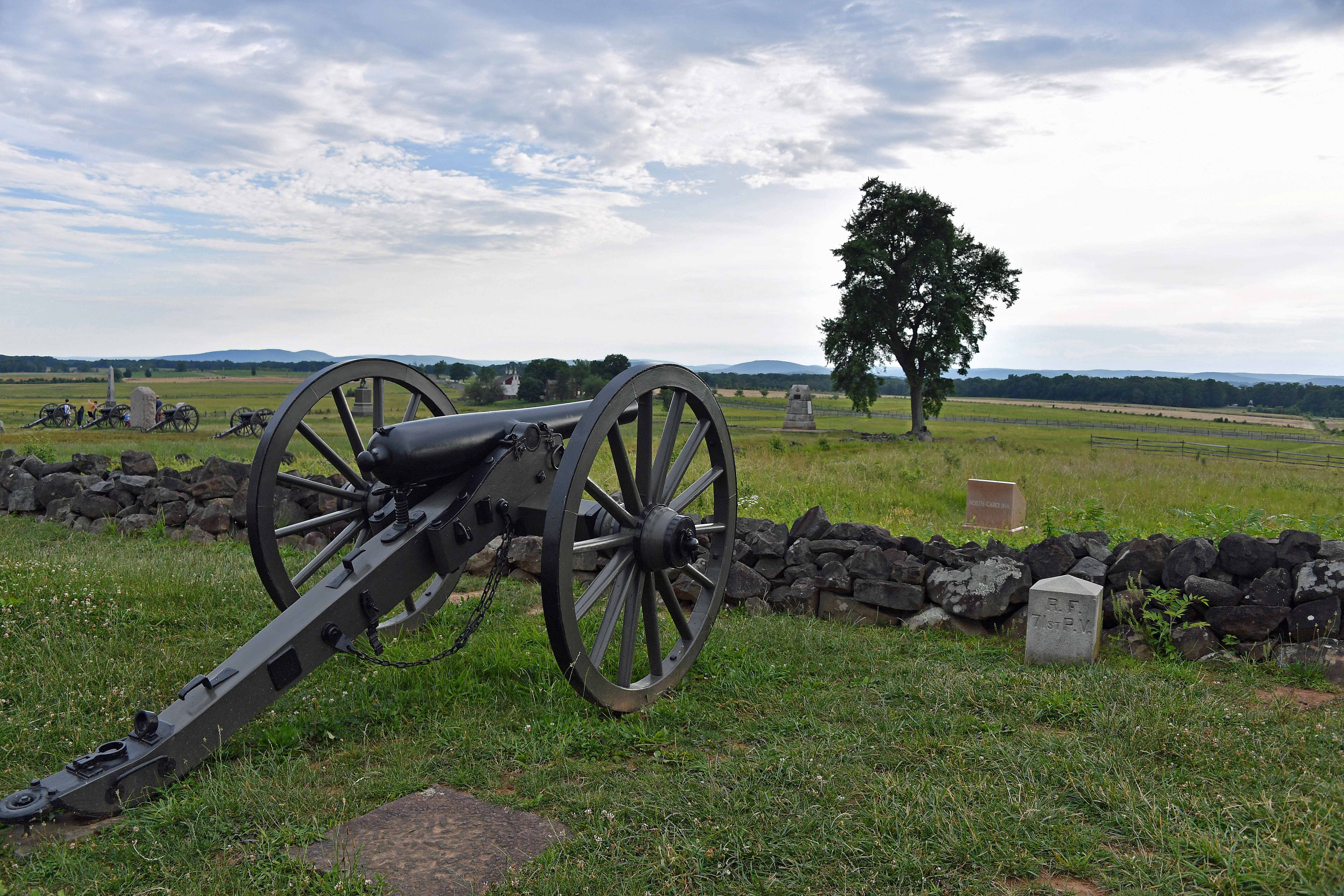
Cannon facing from Hancock Drive to the tree at the Angle on Cemetery Ridge
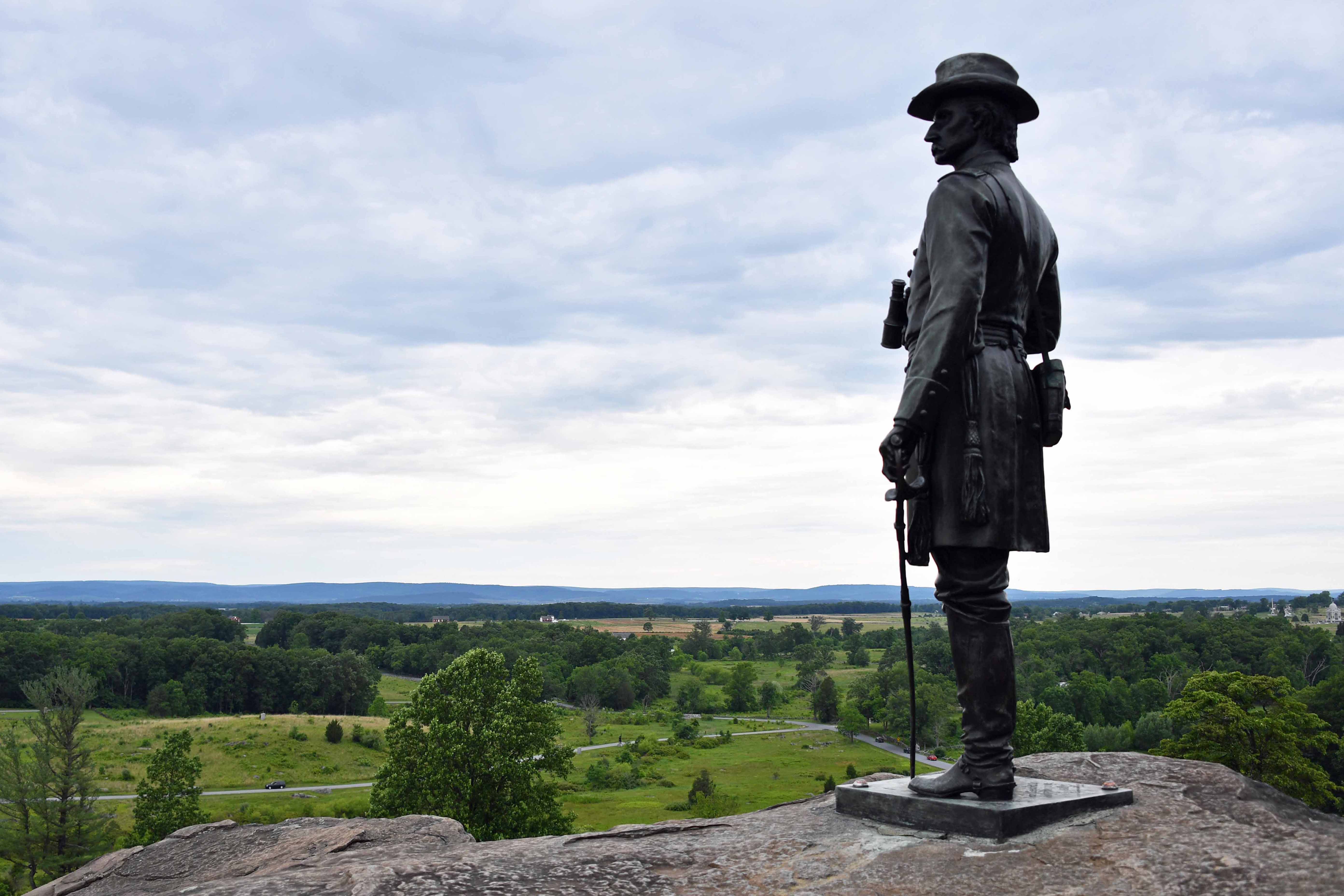
The best views of the battlefield are from the top of the Pennsylvania monument or Little Round Top, where a statue of Gouverneur Warren overlooks much of the ground fought over on July 2 and 3. Given the terrain, it’s easy to see why the fighting was so difficult and intense around Devil’s Den, Little Round Top, and the wheat field on July 2, especially the kind of close-quarter fighting made necessary by the limited range and accuracy of the available weapons.
Statue of General Gouverneur Warren on Little Round Top facing Plum Run. The Devil’s Den is to the left (not shown). Cemetery Ridge extends to the right.
Looping around to the Peach Orchard and the Emmitsburg Road, the view of the ground that the Confederates attacked over on July 2 and 3 opened up. I was especially taken by the number of folds in the ground that served to hide attackers or defenders from direct fire. Just past the Codori Farm, you can come off the road to walk across the ground leading up to the famous “Angle” and “Copse of Trees” that mark the maximum penetration of the Confederate troops in Pickett’s Charge on July 3. This Smithsonian project helps people visualize what troops could see on the ground during the battle.
The Final Slope of Pickett’s Charge
Although the Confederate troops were under sustained fire from cannon and Union skirmishers for quite a long time, the effect of musket and rifle fire only took effect after they moved across the fences at the Emmitsburg Road towards the low stone walls that marked the Union line. The distance varies because of the way the road and wall are laid out, but most would have had to travel 200 to 250 metres across bumpy ground up a slope to where the defenders waited. Walking briskly from the road to the wall took effort; running or charging complete with battle equipment into lines of defenders firing at you (including cannon firing canister over open sights) took more courage than I can comprehend.
The cannon faces the Copse of Tress on Cemetery Ridge. The Angle is to the left of the barrel.
The next day I was even more limited for time as I had to get back to Dulles for a flight back to Ireland. I visited the excellent National Park Service Museum and then drove to the Virginia Memorial on Seminary Ridge, at approximately the point where Robert E. Lee watched Pickett’s Charge. You can walk out towards the Emmitsburg Road from this point to reach a line of cannons and see the ground over which the Confederates advanced in the early part of the charge. Once again, you get a view of how the land undulates with places where troops are hidden from attackers for a time before they emerge again under fire.
Recreating the Battle
Around the battlefield you might meet people dressed in Union and Confederate uniforms like the gentleman shown below who was helping visitors to the Virginia memorial understand what happened there. Every year, people come together to reenact the battle over three days, all of whom are dressed as accurately as possible. The reenactment doesn’t happen on the actual battlefield; its site is a few miles away.
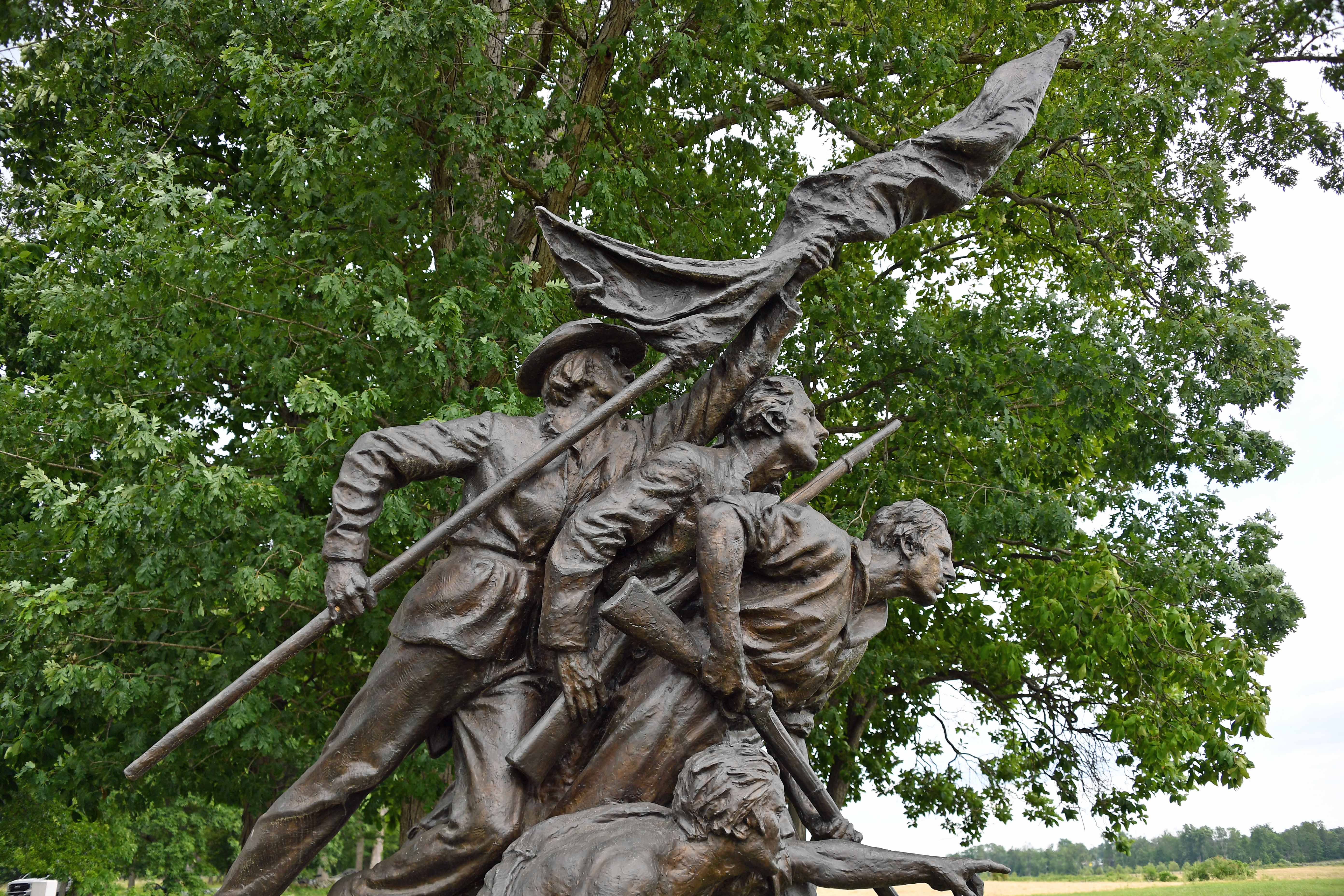
Recreating a Confederate soldier at the Virginia Memorial
Books to Read
Even though my time in Gettysburg was limited, I got a lot out of the trip, probably because I read several books beforehand. These are the ones that I found most interesting:
Gettysburg: The Last Invasion (Vintage Civil War Library) by Allen Guelzo (nice coverage of the battle as a whole, including the military conditions, and my favorite book on the topic).
During my visit, I enjoyed visiting some of the antiques stores, notably the Horse Soldier. Go there if ever you want to see a collection of civil war muskets, rifles, swords, and pistols outside a museum. Regretfully, it wasn’t possible to take one of their muskets home to Ireland (Aer Lingus and the Irish Government don’t like that sort of thing).
Lessons Learned on the Road to the South of France
Being a brave sort, I decided that it would be an excellent idea to buy a full electric vehicle and drive it to the South of France, which is how I became the proud owner of an Audi e-tron 55 quattro. Normally, we drive down to Flayosc, a small village near Draguignan in the Var, annually. Over the years, we’ve used an Audi A6 (saloon and Avant) and most recently, a Porsche Macan. All were diesels, and all were capable of a range of between 800 and 1,000 km (depending on driving style) between fill-ups.
Practical Driving Range
Driving a full electric vehicle would be a different challenge. Although Audi claims a range of 391 km on a single charge (based on the WLTP range of 248 miles), other reports put the e-tron’s practical range at 360 km based on a usable 83.6 kWh battery. More importantly, the real highway range in summer is cited at 330 km based on an average consumption of 25.3 kWh/100 km. In much the same ballpark, Wired reports the range as 204 miles (326 km).
Given that you never want to exhaust the battery of an electric car and that you normally charge the battery to around 80% (the last 20% is the slowest part of charging), it seemed wise to plan on driving stages of around 200 km. This is acceptable, as we’d normally stop for a coffee and a rest every two hours, especially with a dog in the car. Finding the right places to stop and the the extra time needed to charge the car made the trip longer and more complicated (you always need a backup plan if the pumps at a chosen charging location aren’t working). This is now called “holiday planning.”
Leaving Dublin
Setting out from Dublin, the car reported a range of 326 km. The first hitch was discovering that the advertised eCar charging point on the Irish Ferries ship MV Ulysses only supports the older charger used by Japanese cars like the Nissan Leaf and not the European standard Combo CCS (50 KW) or Type 2 (43 KW). The on-board electrician was apologetic and said that the ship is due to be upgraded. In any case, we didn’t need the charge as we’d planned to stop at other points in England.
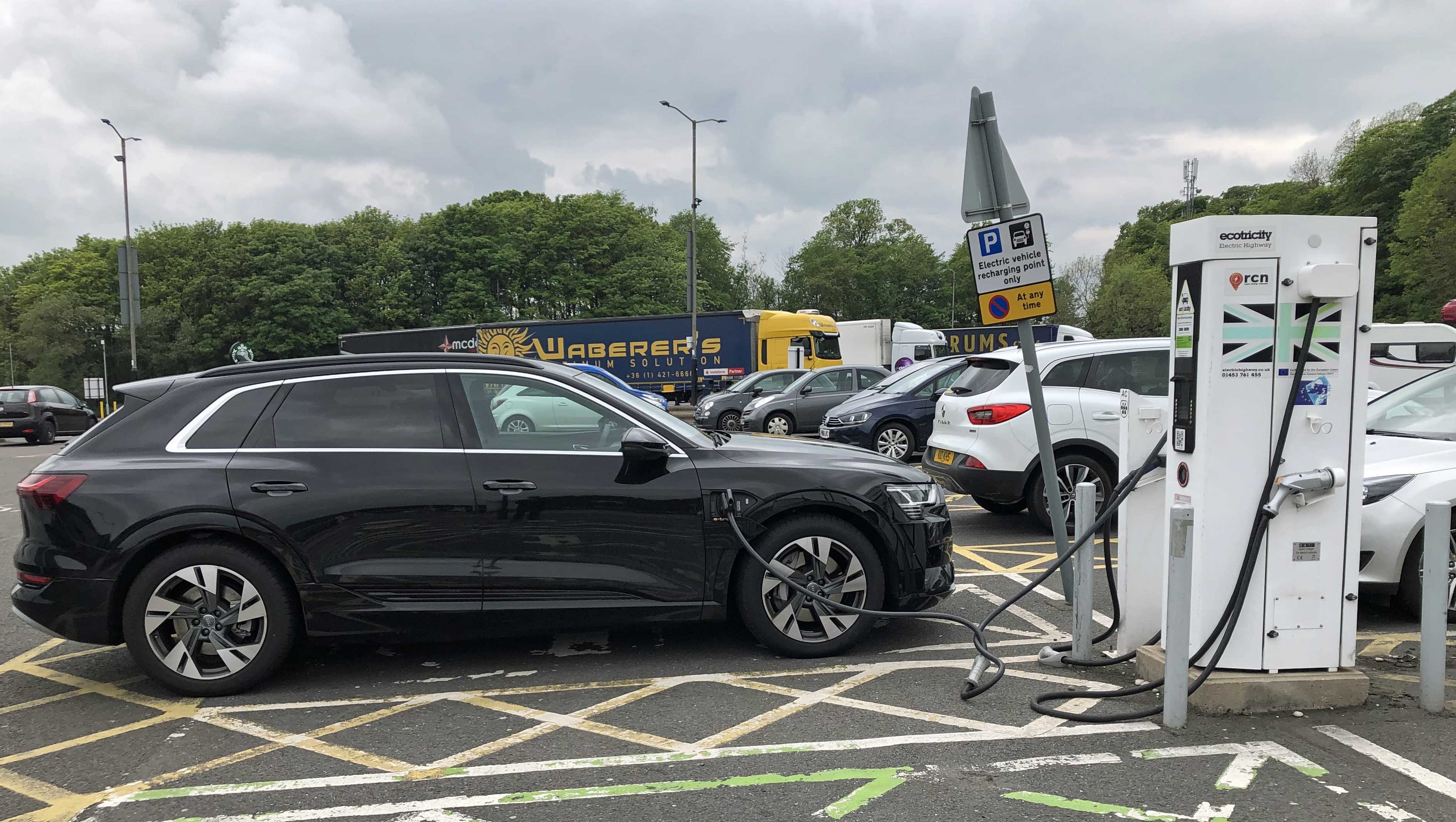
The run from Holyhead through Wales and into England was uneventful and after 211 km we pulled into the motorway stop at Keele with 108 km range left. According to the car, the consumption was 25.3 KwH/100 km. We used an Ecotricity station (50 KW Combo CCS) to charge (Figure 1). Ecotricity limits their sessions to 45 minutes to make sure that people don’t occupy stations for too long (you can start another charging session afterwards if no one else is waiting) and the charge added 36.6 kWh to the battery.
Figure 1: Charging at an Ecotricity pump in Keele, England
First Big Point: Make sure that you sign up for charging providers on your route and have their RFID cards or smartphone apps to hand when you travel. You might need to sign up with several providers like Ecotricity and Chargemap to ensure you can use any charger you meet on a trip.
Problems with a Pump
The next point was Warwick, about 124 km from Keele. The Combo CCS station was occupied by a BMW i3, so we had to wait for 20 minutes. Unhappily, once we plugged in, the station refused to connect to the car. We called Ecotricity support, who restarted the station remotely, but nothing worked. There was nothing to do but to move on to the next charging point at Cherwell Valley, 38 km away. We arrived there with 90 km range remaining and the charge was uneventful and gave us enough power to easily reach our overnight stay in London. We charged the car overnight using a standard domestic plug (very slow), but it did add some useful range.
Overall, the run from Holyhead to London took about two hours longer than we’d expect in a diesel car. However, 45 minutes of this was taken up trying to deal with a recalcitrant pump. The total cost of the two charges was EUR23.66.
London to France
Next day, the run to the Eurotunnel (126 km) was marred by an accident on the M20 causing a 35-minute delay. This spoilt my plan to charge the car (and get breakfast) at the M20 Junction 11 service station before continuing to France. In any case, we got to the terminal and were directed to an earlier train (Eurotunnel were clearly coping with the effect of the M20 accident by pushing people onto trains as they arrived).
Consumption over all the runs in England and Wales averaged 25.8 kWh/100 km based on keeping to the 70-mph limit (113 km) on motorways. French autoroutes allow higher speeds, and this had a noticeable effect on pushing consumption towards 27 kWh/100 km when driving at the 130 kph limit.
Calais to Troyes: Two Charges, Some Experiences
We drove 460 km from Calais to Troyes and had two charging stops. The first was at Rely on the A26 autoroute. The charger allowed us to take as much time as we liked (it charges per minute), so we took a 66-minute charge from a Combo CCS to give us 270 km of range before setting out towards Reims. Some other charges we met further south restricted a charge to an hour’s duration, so it all depend on the network.
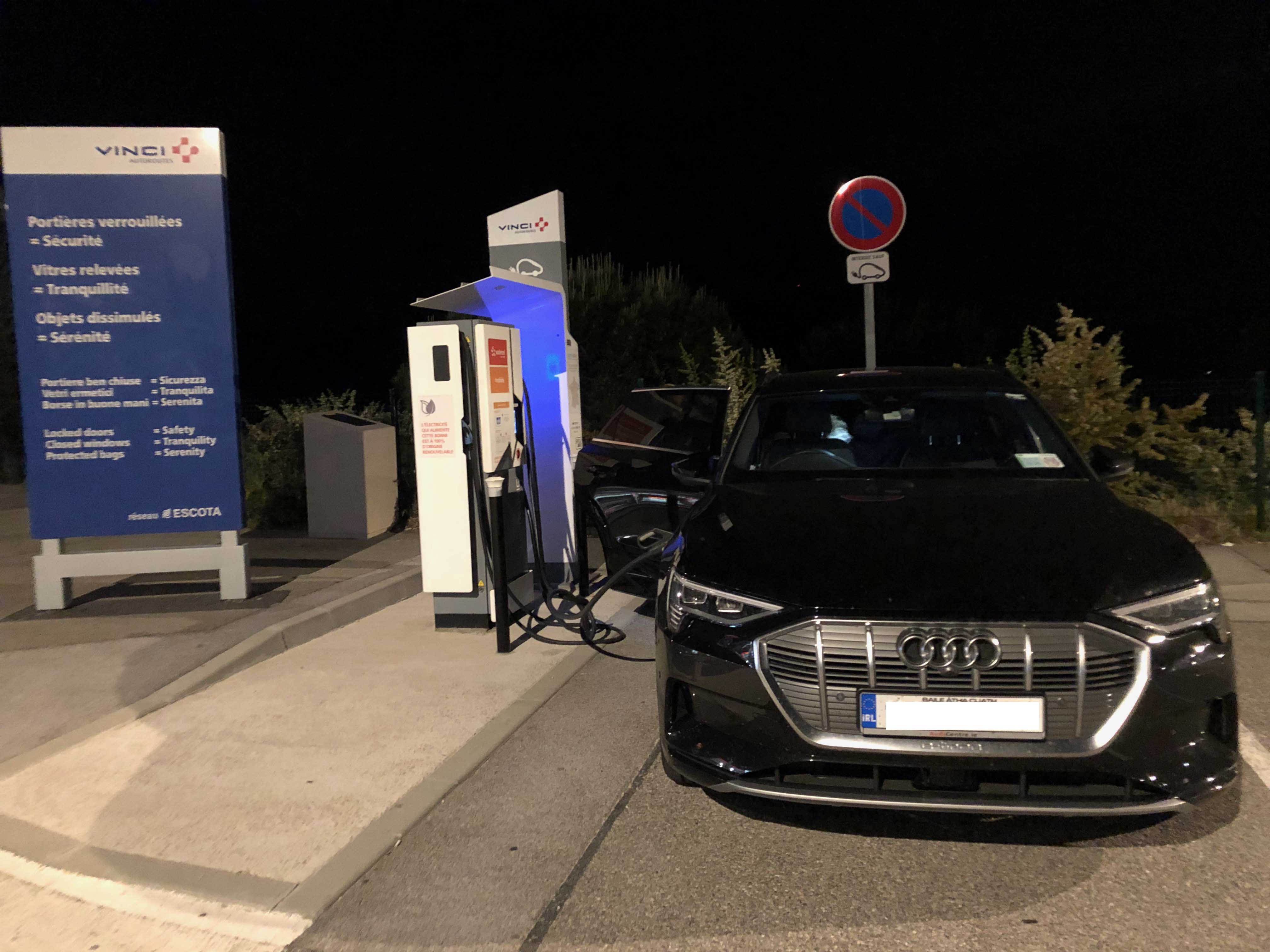
Here we took a small diversion to an Ionity charging station at Geuex on the A4 (Figure 2). Ionity is a network of high-speed chargers backed by Audi and other European manufacturers that promise charge output of between 150 KW and 350 KW, which clearly makes a huge difference to charging times and brings it close to the time you’d expect to spend to refuel a petrol or diesel car. The Ionity network is rolling out slowly across Europe, so the charging points are hard to find. I wanted to try one, so we took the detour.
Figure 2: e-tron charging using an Ionity pump at Geuex, France
If you get an Ionity charger that works, it delivers. Unfortunately, several the points that we looked at were out of operation for one reason or another and the first that we plugged into failed to charge the car. In fact, the charging cable also stubbornly refused to detach from the e-tron. A call to Ionity support had them reboot the station to see if that fixed the problem. It didn’t. The next advice was to wiggle the cable carefully from side to side. This worked and the cable parted company from the car.
Second Big Point: The status of charging pumps shown on online maps is unreliable. You won’t really know if a pump works until you try it.
Figure 3: Ionity makes fast charging happen
Charging with Ionity is so much faster than
anything else. In 30 minutes, the car lapped up 65 KW and got near full range.
It would be great to have (working) Ionity chargers everywhere but that’s going
to take some years. It would also be nice if the chargers were equipped with longer
cables as it was sometimes hard to attach a cable to the side charging position
of the e-tron. Some chargers are designed with the idea that all cars charge at
the front or rear, so the car can drive or reverse into a slot and connect to a
short cable. That theory falls apart with side-charging cars like the e-tron.
Fully charged by Ionity, there was no more drama en route to the overnight stop in Troyes.
The Importance of Finding a Charger
The next day, we reviewed the progress made by the car so far and decided to cancel our planned overnight stop south of Lyons in favor of a long day’s driving to get to our destination. Things started well with a stop at Fresnoy (on the A5 and just 18 km from the hotel). Charged with 285 km range showing, we set off the 208 km to the next stop at Beaune Tailly.
At the time of writing, the autoroute stop in Tailly was under reconstruction. It also includes a truck stop. I misread the directions at the entrance and we ended up in the truck stop with no way back to the area where the charging pump is located. This meant that we had to drive back onto the autoroute to the next exit, make a u-turn, and come back up as we hadn’t enough range to go to the next charger at Macon La Salle.
Third Big Point: Pay attention to where charging pumps are located in stops. Sometimes the pumps are clearly marked, sometimes they are not. If you drive past, you might not be able to get back to the pump. Online sites like chargemap.com help by showing locations, but they might not be accurate, so keep your eyes peeled.
This wasted time and range, and we were down to 50 km when we approached the autoroute stop at Beaune Merceuil (north), which also had a charging pump. We came off the autoroute, found the pump, and tried top charge. Unfortunately, for whatever reason, the car and the pump refused to communicate despite the pump control software being rebooted twice by remote support. After wasting 45 minutes, we decided to go back to the Beaune Tailly stop. This time, we made no mistake, found the pump, and began charging with the e-tron busily issuing messages that we needed to “charge soon” as we were down to 35 km range.
Fourth Big Point: If you get into trouble and have to ring a support number, the people at the other end can probably do two things for you. They can reboot the control application that runs a recalcitrant pump to bring it back online. This might help, but in the two cases I went through this process, it didn’t. If you do ring a support number, expect to spend 10-30 minutes sorting things out, including time to reboot the pump. Second, they might be able to give you some advice about connecting a particular model of car. The e-tron, for instance, seems to be very sensitive to how the pump connector is inserted into the car. Sometimes the pump connected first time and sometimes it needed a couple of attempts.
Getting to the South
If your car runs down its battery, it’s going to take some time to get it to a point where it can cover any distance again. Prepare to spend some time investigating all the delights offered by autoroute stops. There usually aren’t too many to enjoy and the coffee available varies from awful to acceptable – the brews served by Paul’s (the sandwich shop) is probably best. After a long charge to get some decent range, we set off again for a brief run to Mâcon La Salle, where we stopped again to bring the battery to close to full charge.
The site had an Ionity crew working on the early phases of a new charging station. We saw another Ionity station at Montélimar, so the high-speed charging network is being built out slowly.
From Macon, we drove through some horrendous rush hour traffic around Lyons to Saint-Romain-en-Gal, where we stopped to charge, exercise the dog, and buy some groceries. We could have gone on to Pont-de-l’Isère, but decided that a better stop strategy was to charge at Montélimar and Trouves (Les Terrasses de Provence) en route to Draguignan. Other stations were available at Mornas and Lançon-Provence if chargers had not co-operated.
Figure 4: Last charge for the e-tron late at night in the Terrasses de Provence
All of the chargers worked perfectly and we eventually made it to our destination after 842 km on the road from 8 hours and 39 minutes of driving, mostly along autoroute at speeds of up to 130 km/h with plenty of lane restrictions and other slowdowns. The car reported consumption for the day to the 26.3 kWh/100 km. We stopped to charge 7 times, one of which was an absolute failure (and wasted 30 minutes). Taking the 30-minute diversion up and down the A6 autoroute from and back to Beaune and the failed charge into account, we spent approximately 5.5 hours charging the car during the day.
Taking an Audi e-Tron to Provence
Overall, we drove 1,942 km to get from Dublin to our destination in Provence. Provided it had enough battery, the e-tron performed superbly on the road. It’s an easy car to drive and is very quiet and refined. Some of its driving aids need a little refinement, such as the habit of the adaptive cruise control to want to keep to a 30 km/h limit when leaving autoroute toll booths (no other car in France does). The traffic sign recognition system also made a few mistakes picking up 90 kph limits that only applied to cars towing caravans. It was a little disconcerting the first few times the car suddenly wanted to drop from 130 kph to 90 kph without warning, but maybe this is just a reminder that driving aids don’t remove the responsibility of the driver to drive.
As to cost, I paid EUR23.66 in the U.K. and zero (so far) for the French trip because I used Audi’s offer to provide an RFID charging card for a year for every new e-tron. I might have to pay EUR8 for the Ionity charge, so that’s EUR31.66. Chargemap charges 0.2379 cents per KW for autoroute stations (off the autoroute, the charge might be a little cheaper at some stations – or even free), so an average 43 KW charge costs EUR10.23. We charged eight times as we drove through France, that’s EUR81.84. 135 litres of diesel might have been consumed (at 7l/100 km) by my Porsche Macan, so that would have been approximately EUR203 to fill based on a mix of autoroute and non-autoroute filling stations. On this evidence, electric cars are definitely cheaper to run, even on long-haul trips.
You can certainly cover a lot of ground with an e-tron in a day. Being forced to spend an hour or so at each charging point is OK if you build the time into the day and know what you’re going to do with it (see coffee comment above). The introduction of more Ionity high-speed chargers across Europe will make a huge difference by cutting charging times by two-thirds (50 KW versus 150 KW technology) with the promise of doing even better in the future with 350 KW chargers. Of course, a charger is useless if it doesn’t charge and the control software running on the pumps does seem a little fragile based on our experience (1 fail in the U.K., two in France, including an Ionity pump). Failing to charge when your car is really low on battery is not a nice experience and takes away from the EV experience. My expectation is that the charging network will become more robust and widespread. If it doesn’t, driving an EV like the e-tron will always have a certain risk.
Skellig Michael is a steep, rugged, twin-peaked crag located 11.6 k m off the west coast of county Kerry, Ireland. The reason why you want to go to Skellig Michael is to visit the well-preserved monastic settlement built 600 feet above sea level. And of course, if you’re a Star Wars fan, to see the locations used in “The Force Awakens” and “The Last Jedi.” The only Jedis in evidence on Skellig Michael will be those who dress in the part during their visit.
Travel
The route out to the Skelligs is via boats licensed by the Irish Office of Public Works (OPW), which travel from places like Portmagee from May to October. Even if you book with a licensed operator, the vagaries of the weather mean that you can never be sure that you’ll get to the island. The OPW might close the island if the weather is too severe and boats will not go across if the sea conditions are too rough.
Typical boat used to travel to Skellig Michael. Note the swell – and this is on a day with little wind.
In our case, we were lucky to travel on a day between two bad days. Even so, the conditions varied enormously from clarity in Portmagee through a transit in a sea mist with visibility down to 50 meters before we landed. During the two and a half hours allocated on the island, the mist gradually cleared but never disappeared totally. The ride back was in bright sunshine and some on the boat were sunburnt when they got back to port.
Selecting an Operator
A variety of operators are available. Among the questions you might ask before you commit to one are:
Is cover available in the boat in case of rain during the transit?
What facilities are available on the boat? For instance, a working and clean toilet.
How long does it take to get to the Skellig? Our boat was slow and was passed by many others. This might be important if you are prone to seasickness. We took 75 minutes on the outward leg and a little longer on the return. The extra time was accounted for by a visit to Skellig Bheag (“little Skellig”), an uninhabited twin of Skellig Michael where landings are not allowed. Skellig Bheag supports a colony of 60,000 gannets and some seals.
How much does the trip cost and how can you pay? We paid a deposit of EUR20 each online via credit card to reserve the trip, but then had to pay the balance in cash on the boat. The ticket mentioned this point, but it’s easy to forget to have EUR80 each after you make a booking many months in advance. There is no ATM available in Portmagee if you turn up without cash.
Overall, you should expect to spend about six hours travelling to and from Skellig Michael and the time on the island.
The landing place at Skellig Michael. It’s not always this calm and sunny.
Walking on Skellig Michael
The weather can change dramatically on Skellig Michael. Remember, you’re out on a rock in the Atlantic Ocean. As such, make sure that you wear appropriate clothing and can deal with rain, sun, wind, and a combination over a short period.
Good footwear is critical because much of the climb up to the monastic settlement is over roughly-hewn medieval stones set into a steep gradient. The initial phase from the landing point via the helicopter pad lulls you into a false sense of security because it’s over a well-made path that doesn’t cause any concern.
Climbing up a typical section of rough-hewn steps
Chain support – but only in two places
Support chains are available to hold in two places on the climb, but you’re on your own for the vast majority of the ascent. Many people bring ski poles or sticks to support themselves.
Descending from Christ’s Saddle
Looking down from Christ’s Saddle towards the original landing point
The Monastic Settlement
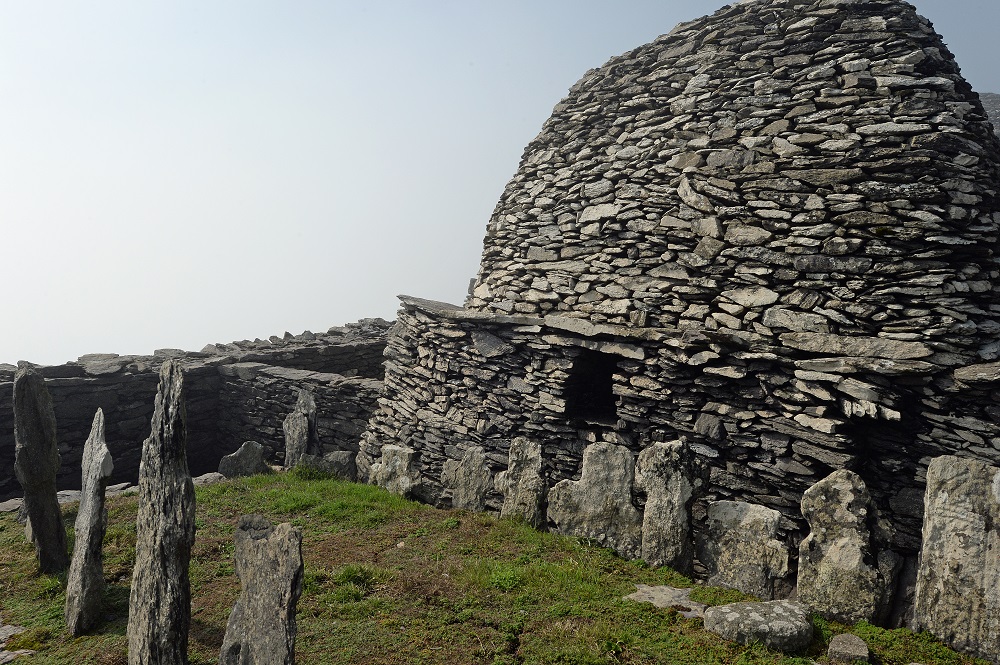
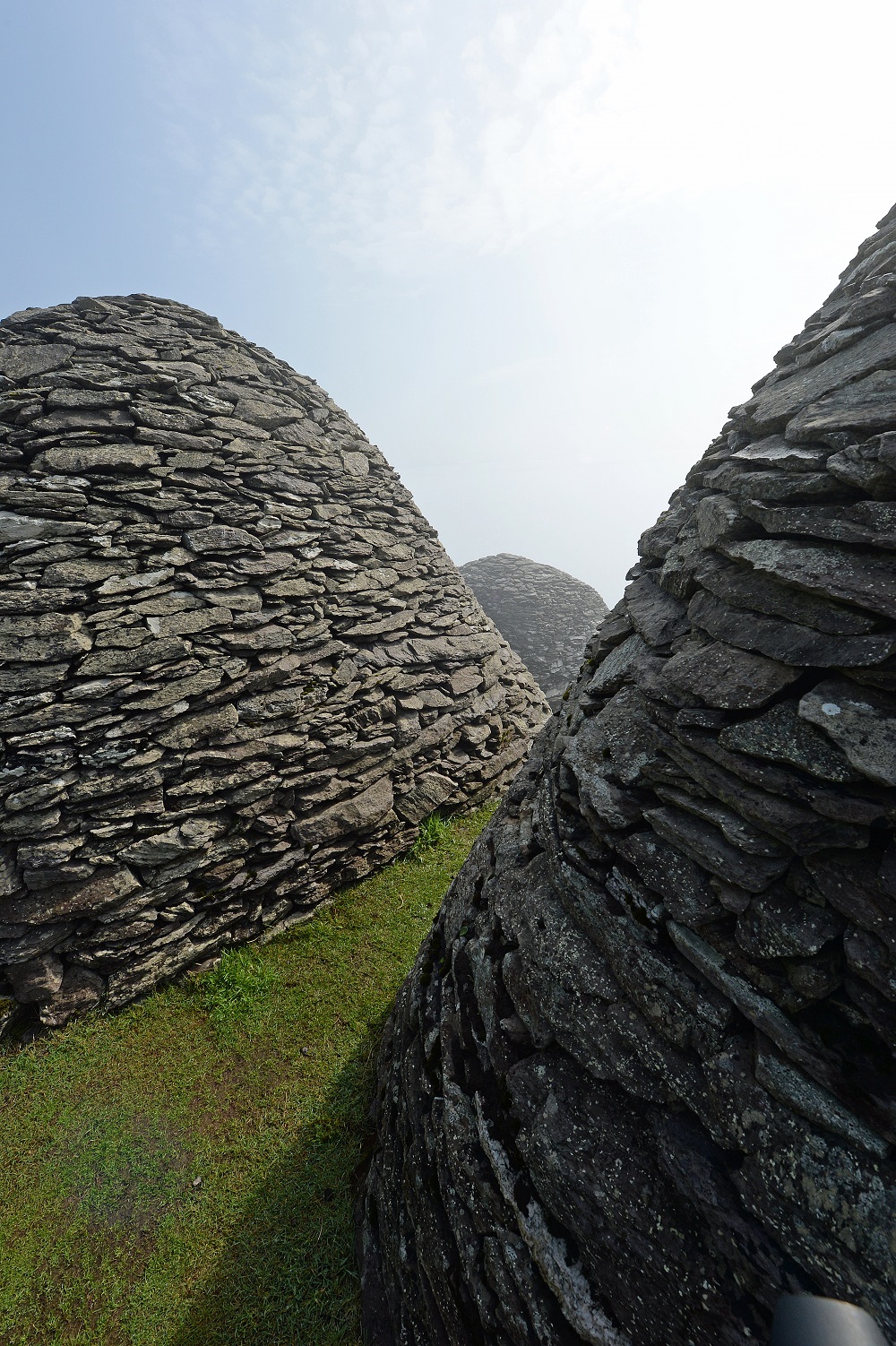
The settlement dates from about the 6th century and was occupied until the 12th or 13th century. It features six beehive-type cells, two oratories, and a church together with walls, slabs, and crosses. The settlement has been a world heritage site since 1996.
The great cross and cells
Oratory and what might be slabs marking a burial ground
Two of the cells showing details of their dry-wall construction
Walls protecting the settlement – the Macgillycuddy Reeks peer out the the mists in the distance with the peak of Skellig Bheag closer
View of Skellig Bheag rising from the sea mist as seen from the monastic settlement
It’s easy to spend 90 minutes or more investigating the different aspects of the settlement, including the system used by the monks to trap rain for their freshwater supply. The area can be crowded but patience and good humor makes sure that everyone gets the photos they want.
There are no bathrooms or other facilities on Skellig Michael. Anything you want has to brought with you, and if you’re taken short you’ll have to find somewhere safe and discreet to do your business.
The Descent
It’s physically harder to climb up to the settlement but it can be as demanding to descend back to the landing place. The steepness becomes more apparent, especially on the walk down from Christ’s Saddle when you can see the open sea beneath you.
View from the Wailing Woman rock towards the landing point with Skellig Bheag shrouded in mist. Note the boats waiting to come in to pick people up from the island.
Some of the amazing scenery on the descent (it was too misty to see this on the ascent)
For those interested in fitness trackers, I registered about 6,500 steps on Skellig Michael, and my device told me that I had gone up the equivalent of 85 stairs. Anyone in reasonable physical condition will be able to make the climb, provided that they take their time and pay attention to where they place their feet.
Return via Skellig Bheag
On the return, most boats travel around Skellig Michael to see the lighthouses (original and new) and the original landing place used by the monks before heading across to Skellig Bheag. The estimate is that 60,000 gannets use Skellig Bheag as their nesting place before they head south in September. The smell of so many gannets is quite something, as we discovered when we arrived downwind of the island.
Some of the 60,000 gannets in residence on Skellig Bheag
You can also see grey Atlantic seals on Skellig Bheag.
Grey Atlantic seals
The last sight before turning back for the mainland was the view of the Elephant’s Trunk on Skellig Bheag with Skellig Michael in the background.
The Elephant’s Trunk
Worth the Trip
A trip to Skellig Michael is absolutely worth it. Go in June or July if you want to see the Puffins (they had all departed when we were there). Make sure that you are well-equipped for the weather and the climb and remember to bring water and something to eat. Sea bands or tablets can help to avoid seasickness on the rides out and back from the island, and when you get back ashore have a pint to celebrate seeing something that’s very unique.
Last Friday night, I received a note from “Hyman Cipolletta” using the Outlook.com account rriivoryorz@hotmail.com. The message header shows that the message originated in a North American server (Namprd12.prod.outlook.com) in the common Office 365 infrastructure shared by Exchange Online and Outlook.com.
My interest was tweaked by the subject, composed of an old password and my Gmail account name. The message (Figure 1) started off:
“I won’t beat around the bush. I am aware xxxx is your password. Moreover, I know about your secret and I’ve evidence of your secret. You do not know me personally and nobody hired me to investigate you.”
Figure 1: The message demanding a Bitcoin payment
The Scam
0.75 BTC is EUR5,276 or US$6,147 at today’s rate, so the sender of this note had serious intentions. They demonstrated that they knew something about me (my Gmail address and an old password) and laid out a rational explanation for what might had happened. The flaw in the argument was that I knew I hadn’t been near any adult video sites, so the description of a keylogger being installed on my PC couldn’t have happened. And without the keylogger, no contacts from Facebook, Messenger, and email could have been gathered.
But if you had been tempted to go near such sites, it’s possible that what was described might have happened, which is why scammers lay out a plausible story in the hope that some of the millions of people they send email to will panic and believe that their watching habits would soon become public.
Internet to the Rescue
You might blame the internet for making porn easy to access. When it comes to scam, the internet is pretty fast at reporting their techniques and letting people know what’s really happening. A quick search revealed many descriptions of similar emails. Here are two:
Brian Krebs broke the story on July 12 and it seems like since then scammers have been working their way through a store of stolen email addresses and passwords to try and convince as many as they can to send them various sums of money. I guess I should feel good that my demand was at the high end of the spectrum as others have been asked for far less.
Payments Flowing In
What’s distressing is that some people are paying the scammers. @SecGuru has been able to keep track on some payments (Figure 2) and it seems like the scam is profitable.
Figure 2: Cash flows in for the scammers
How Did the Scammers Get My Data?
If you go to Troy Hunt’s Have I Been Pwned site, you can find a list of sites where attackers have stolen email addresses and passwords. Looking through the list, I find sites that I use, like LinkedIn, where over 164 million addresses were compromised, and Disqus, also with sites that I occasionally used, like Ancestry.com. A simple check revealed that my email address is on 4 breached sites, so the scammers have a choice of sources where they can find my address.
What to Do
In any case, the password cited in the email is an old one that I don’t use today. This means that the combination isn’t worth much to hackers, especially as I use multi-factor authentication (MFA) whenever possible to protect any important site that I use.
If you receive an email that contains a password you still use, you should obviously change that password on any site where it is still active. And if possible, take the choice to use multi-factor authentication to improve security. Services like Gmail, LinkedIn, and Office 365 support MFA.
Above all, don’t respond to the scam. Ignore the message, unless you feel that you should report it to the local police force (as recommended by some experts). Personally, I don’t think that most police forces can do much about this kind of scam. I reported the email to Microsoft (use Outlook’s Report Message add-in) so that they can improve their ability to block rubbish like this in their anti-malware tools.
Scams are a Pain
The popularity of email as the lingua franca for communication across the internet means that attackers like finding new ways of poking at human vulnerability to make money. This is just another example of a scam that’s popular right now. Do the right thing and secure your passwords and you’ll be fine. Stay safe!
Changes and updates made to “Office 365 for IT Pros (2019 edition)
Original release: July 1, 2018.
We’ve launched a new web site to host information about the book. The change log for Office 365 for IT Pros is now located there.
This document describes the changes made to the book since its original release. The document is up-to-date as of the version released on August 4, 2018. We try and release an updated version regularly, usually on a Saturday unless something like a major conference disrupts our ability to produce an update.
Changes per Chapter
Chapter Number (bold) and number of changes
1
2
3
4
5
6
7
8
9
10
1
1
1
2
2
3
2
1
11
12
13
14
15
16
17
18
19
20
1
3
4
1
1
2
1
21
22
23
24
25
1
2
Table 1: Distribution of chapter updates
We have released 4updates for the 2019 edition since its publication: 7 July, 14 July, 28 July, 4 August.
You can find update information on the inside cover of the book.
Amazon notified purchasers that an updated file for the Kindle version:
We can only ask Amazon to update monthly and even so, sometimes they do not agree that we make enough changes to justify them sending a notification to customers that they can download the updated file.
Chapter Changes for Office 365 for IT Pros, 2019 ed.
Date
Chapter
Change
4 Aug
4
Customer lockbox approver role now available.
4 Aug
6
New workflow to delete users in the Office 365 Admin Center.
4 Aug
8
Modern team sites can be created without being connected to an Office 365 Group.
4 Aug
11
Some UI changes for Office 365 Group creation in OWA, so we updated our figures.
4 Aug
13
Meeting settings for a tenant have been transferred from the Office 365 Admin Center to the Teams and Skype for Business Admin Center.
4 Aug
20
Inserted text dealing with non-English characters in search keywords.
28 July
1
Microsoft stores some AAD attributes for user accounts in the U.S. Added number for commercial cloud annualized run rate after Microsoft Q4 FY18 results.
28 July
2
Updated statistics about Microsoft cloud network.
28 July
8
Microsoft has paused the roll-out of the increase of versions for SharePoint and OneDrive document libraries.
28 July
12
Added more text about how to update photos for guest users.
28 July
13
Microsoft announced that Teams has reached feature parity with Skype for Business Online. Meetings now support up to 250 participants. Added text to describe how the inline translation of messages feature works.
28 July
14
Discussion about how to mark Office 365 Groups as team-enabled.
28 July
19
Minor wording changes.
28 July
24
Rewrote section explaining how to apply protection to messages with transport rules and included text to explain how to insert AIP labels with transport rules. Also, technical editor picked up a couple of things that we fixed or improved.
14 July
7
Improved the script to report shared mailboxes.
14 July
8
SharePoint Online now supports page metadata.
14 July
9
Added link to Microsoft Graph training available on GitHub.
14 July
12
Rewrote section about Classifications in the Groups policy.
14 July
13
Teams supports keyboard shortcuts to zoom in and zoom out. Information about the free version of Teams announced on July 12.
14 July
17
Added new statistics for email usage in 2018-2022. Added sections on Mail Flow Insights (new dashboard) and SIR rewriting for P1 addresses to avoid SPF failures on forwarding.
14 July
19
Added clarification about tracking holds placed on inactive mailboxes.
14 July
21
Be more specific about the audit events generated for SharePoint Online. Also, Microsoft has announced that they will enable mailbox auditing by default within Office 365 by the end of 2018.
14 July
22
Tracked down some bad hyperlinks and fixed them. Refreshed some graphics.
7 July
6
Fixed some typos and improved some PowerShell.
7 July
7
Several updates after a technical review of content that we couldn’t complete before publication.
7 July
8
Idle session timeout policy for SharePoint and OneDrive is now GA. Also, 8 new cmdlets are available to help with SharePoint migrations. Added new section covering features that Microsoft has deprecated in SharePoint Online.
7 July
9
Minor clarifications in text.
7 July
10
Microsoft will remove the old OME app from the Apple and Android stores on August 1, 2018. Also, Microsoft is making some changes to EWS for Exchange Online.
7 July
12
Added information about how to add photos for guest accounts.
7 July
13
Added some extra context about hiding teams from Exchange clients.
7 July
24
Microsoft will enable rights management automatically for eligible tenants from August 1, 2018. Also, a change in how Exchange transport processes email sent to Teams channels means that you cannot send encrypted messages to this destination.
All good things come to and end and it’s time to finish up with the 4th edition of Office 365 for IT Pros. We will cease work on the 4th edition on July 1, 2018 and retire the edition soon afterwards.
Originally released on June 1, 2017, we have updated the 4th edition 51 times since to keep pace with changes inside Office 365. We added a net total of over 150 pages of new content during the year. We hope that you enjoyed the book and found it helpful in your work.
Introducing the 2019 Edition
We are now preparing for the release of the 2019 edition of Office 365 for IT Pros. Why 2019? Well, Microsoft’s 2018-19 fiscal year starts on July 1, 2018 and we want to align our release to their fiscal year. We also call this book the fifth edition, so you can use that name if you prefer.
Although we added a lot of new content to the 4th edition, we know that we needed to expand into new areas of Office 365. The 2019 edition includes a chapter on Flow for the first time, has a dedicated chapter for the basics of SharePoint Online and OneDrive for Business, together with in-depth coverage of the transition of Skype for Business Online to the Microsoft Phone System and Teams. We have restructured the book to create a more natural flow and taken the opportunity to slim the book a little by removing older (but still valuable) content to a companion volume that will be available separately.
Our author team has changed too, as we say goodbye to Paul Cunningham and Michael Van Horenbeeck and welcome Paul Robichaux, Jussi Roine, Juan Carlos González Martín, Gustavo Valez, and Brian Reid. We thank Paul and MVH for their work on the last four editions of the book and welcome our new contributors, all of whom are MVPs and well qualified to take up the challenge.
Release cadence
Our plans for the 2019 edition are to follow a somewhat more relaxed update cadence. Some of our readers are uncomfortable with a weekly update, so we are focusing on a monthly update now. This does not mean that we will not release more frequent updates to cover important news from Microsoft, but in general, we’re not going to be as hectic as we were over the last year.
Book Variants
We plan to offer the same subscription service for the 2019 edition. You can buy the book from our online store for $49.95 and will receive two volumes:
Office 365 for IT Pros (2019 edition): This is the book we will update regularly. You can download a sample chapter (2) here.
Office 365 for IT Pros (2019 companion volume): A separate 250-page eBook with information that changes less often than the topics covered in the main book. Most of the current text in the companion volume is taken from the 4th edition We think the information is still useful, so we’ve moved it into the companion volume.
When you buy online, you get the books in PDF and EPUB formats. We will continue our arrangement with Amazon to publish a Kindle edition too. However, because you cannot use the same “two books in one” arrangement for Kindle, each book is available separately.
As a special launch offer, you can get a $10 discount until 8 July 2018 by using this code. If you bought a copy of the 4th edition from Practical365.com, please wait to receive the email from Practical365.com with an even better offer for you.
Subscriptions and Subscribers
When you buy a book, you also get a subscription that last for at least one year from July 1, 2018. Subscribers can download updates as they are released during the subscription period. The subscription model enables us to dedicate the time necessary to track, document, and debug (sometimes) change as it happens inside Office 365. We think that our subscription represents extraordinary value because you get a great book (worth the price on its own) and its updates.
If you subscribed through Practical365.com, you should download update 51 of the 4th edition using your Practical365.com account to make sure that you have the latest files.
Office 365 Never Stops Changing
The thing about a cloud service like Office 365 is that it never stops changing. We’ve already started the process of tracking updates for the 2019 edition. We expect lots of announcements and interesting changes to happen at the Microsoft Ignite conference in Orlando in September. The challenge now is to keep pace and keep writing. You can get news about what we do by checking in here or on our Facebook page.
We launched the first edition of the Office 365 for IT Pros eBook at the Microsoft Ignite conference in Chicago in May 2015. At that time, the book was called Office 365 for Exchange Professionals and it was some 600 pages long. Indeed, it was short enough for Microsoft to print 500 copies for distribution to Ignite attendees.
Progress Since 2015
Like Office 365, we’ve come a long way in three years. The 4th edition has grown to 1,150 pages and covers much more than Exchange Online. In 2015, it was natural to focus on Exchange at the start because email was, by far, the biggest workload within Office 365. Things are different now and we’ve seen the advent of applications like Teams and Planner and the growing popularity of SharePoint Online and OneDrive for Business. To match this change, we have invested enormous effort to transform and expand coverage to the current position. As we transformed, we continued to focus on giving administrators insight into how Office 365 works the way that it does, with lots of practical examples of how to solve common deployment and management issues.
We published the 4th edition on June 1, 2017. We are now approaching the release of the 5th edition in early July 2018. The 2019 in the title refers to Microsoft’s 2018-2019 fiscal year (usually called FY19), which begins on July 1. When the 5th edition is available, we will stop updating the 4th edition. The 4th edition will remain online until October 1, 2018 to allow people who bought this edition to update their copies with the latest files.
Author Team
Apart from being able to restructure the book to reflect developments inside Office 365, one of the reasons why we create new versions is to bring new authors into the writing team.
After four editions, MVPs Paul Cunningham and Michael Van Horenbeeck are stepping down from the author team to take up new challenges. I am delighted to announce that Office 365 MVPs Paul Robichaux, Brian Reid, Juan Carlos González Martín, Gustavo Velez, and Jussi Roine have joined the author team to expand the pool of expertise available to generate great content. I’m sure that many of you will have had the chance to read previous books and articles by these authors or listen to them speaking at conferences such as Ignite, TechEd, and Office 365 Engage.
Ståle Hansen and I continue as authors and Vasil Michev continues as our technical editor.
Two Fifth Edition Books
To make it easier to manage our content, we will split the 5th edition into two volumes.
The “main book” is our focus for ongoing updates. It covers new topics like Flow, the transformation of Skype for Business Online to Teams, and includes big updates for SharePoint Online and OneDrive for Business. It continues to deliver comprehensive and updated content about Office 365 Groups, Teams, Compliance, and other emerging areas within Office 365.
We have moved content that does not change as often into the “companion volume.” Here you’ll find chapters on hybrid connectivity, public folders, and so on. With the introduction of the companion volume, we are dropping the “bonus material” that we had for the fourth edition.
Subscribers will have access to both books and all updates issued for both books during the lifetime of the 5th edition. Together, the two books amount to roughly 1,250 pages (PDF).
Subscriber Upgrade
Our normal practice is to offer previous subscribers who bought the book through Practical365.com a low-cost upgrade to the new edition. We will be in contact with subscribers soon to outline these arrangements. The upgrade fee covers all updates that we will issue for the 5th edition.
Unfortunately, we cannot offer an upgrade for the Kindle version. Amazon doesn’t have the facility to allow this to happen.
Book Updates
Like previous editions, you can buy the fifth edition in two ways. You can treat the book like any other traditional volume, buy it as a one-time purchase, and never update the content. You’ll still get great value, but given that Office 365 keeps on changing, we think that the traditional model is old-fashioned and not well suited to coverage of subjects like cloud technology where change happens all the time. This is why we adopted a subscription-based ongoing-update model from the start.
We plan to update the 5th edition for at least a year. We updated the 4th edition very frequently (51 updates for the book covering 315 separate chapter updates) to keep pace with change within Office 365. At times, it seemed like we were updating text as quickly as Microsoft updated features. The upshot was a constantly evolving, always changing book charting the progress of Office 365 over time.
Although we issue completely new books in PDF, EPUB, and Kindle formats for each update instead of forcing people to read original text alongside addendums and errata, some of our readers told us that a weekly update cadence is too frequent and that they were unable to keep track of changes. Accordingly, we will move to more of a monthly update cadence for the 5th edition. Subscribers will be able to download updated files as often as they want.
Kindle continues to be a challenge when it comes to making updates available. Amazon’s perspective is that they do not like asking customers to download updates because people lose bookmarks. This approach works well for novels and other material that does not change often. It’s obviously different when you have a book about a cloud service like Office 365. Before Amazon informs customers that they can download updated Kindle files, we must convince Amazon that sufficient change exists. We try to do this roughly once a month. Sometimes Amazon agrees, and sometimes they decline. We will continue to work with Amazon to make sure that customers have access to updates as quickly as possible.
Thanks
We could not have executed this project without a great deal of help from fellow MVPs, Microsoft, and Quadrotech Solutions, our sponsor. Most of all, we appreciate the support we have received from people who bought copies of the book, including many who have purchased every edition. Without support like this, we would have no reason to keep pushing ahead to understand and document Office 365, to write the PowerShell examples, investigate hidden corners of the service, and push out regular updates. We hope that you will join us on the next stage of our journey.
This week I was in Mainz, Germany for the European Collaboration Summit (ECS). This was a community rather than a commercial event, the difference being that the event is run on a non-profit basis by members of the Office 365 community instead of a for-profit company. However, given that 1,600 people attended (with over 300 on the waiting list), I think ECS is in the category of a super-community event.
ECS Summary
The quality of most of the conference sessions stood up to comparison with any other event in this space, including Microsoft’s headline Ignite conference. Like any conference, some speakers were weaker than others, and some struggled to deliver sessions in English. It’s also true that some better coordination could have happened to avoid content duplication, but generally, you couldn’t complain about the content-rich nature of the sessions.
Because ECS has grown out of the SharePoint community, it’s unsurprising that much of the content focuses on SharePoint. SharePoint is important to Office 365, but it’s only one of the basic workloads and there’s lots more to talk about in an Office 365 context, including Azure Active Directory and the many Azure services that surround and enhance Office 365 applications. I hope that future ECS events will embrace the opportunity to create a more holistic and expansive agenda that covers the whole of Office 365.
But these are minor observations that don’t take away from an extremely well-run and enjoyable conference. Sessions ran to time, the Wi-Fi was generally very good, the audio-visual support worked very well, and the rooms were generally large enough to accommodate everyone who wanted to attend a session. The conference food disappointed some, but I thought it was well up to the expected standard (and there was plenty of it).
All-in-all, if you’re based in Europe, you could do worse than plan to be at the 2019 event, which will also be held in Mainz (June 3-5). You’ll spend far less on your ticket (less than a hundred Euros), Mainz is easy to reach (25 minutes by train from Frankfurt airport), and you’ll enjoy meeting the great and the good of Office 365 at ECS.
Personal Sessions
I gave two sessions at the conference. First, I spoke about the opportunities that exist after a tenant completes their initial migration to Office 365 (usually moving mailboxes) and described some of the areas that tenant administrators might want to investigate. After all, they have to do something to replace the hours previously occupied patching servers and installing hardware. Here’s a download link for the session deck.
Sketchnote of Office 365 session (credit: @LuiseFreese)
My second session explored how to use PowerShell to work with Office 365 Groups and Microsoft Teams. Given that the ECS sessions are only 55 minutes long, I guess it was inevitable that a topic like this would run long, and that’s exactly what happened. In any case, I had some fun with the audience, who tolerated my amateur attempts at coding. And here’s a link to Managing Groups and Teams with PowerShell.
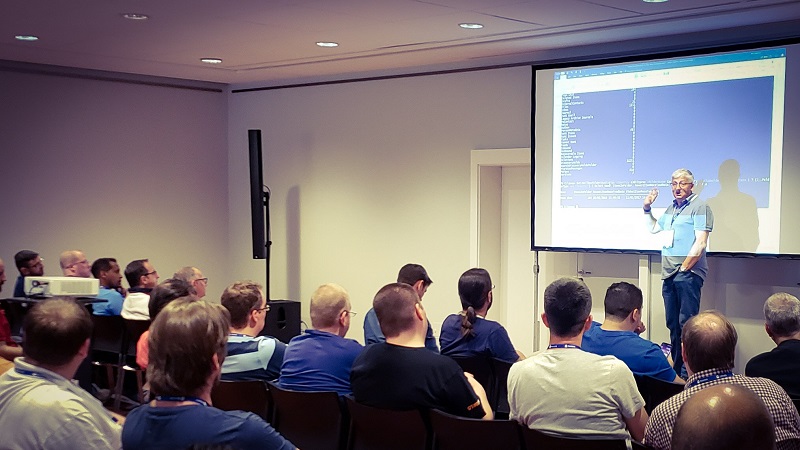
Explaining why server-side filtering is such a good idea when dealing with hundreds of Office 365 Groups (photo: @meetdux)
Like any experienced presenter, I put in some effort to make sure that all the code examples worked when executed in live time. In other words, I had a Word document full of examples that I cut and pasted into the PowerShell command window. I’m not going to publish my cheat sheet here because all the examples and much more are described in Office 365 for IT Pros and some have been used as the basis for my regular column about Office 365 on Petri.com. Go to either place to get the latest version of the code.
In addition, I also moderated a panel session covering all aspects of on-premises and cloud Exchange. No one managed to stump the panelists, so that’s always a good thing… and there were many good questions asked.
Want to know more about how to manage Office 365? Find what you need to know in “Office 365 for IT Pros”, the most comprehensive eBook covering all aspects of Office 365. Available in PDF and EPUB formats (suitable for iBooks) or for Amazon Kindle.






















 Thoughtsofanidlemind's Blog